Contents
Data Cleaning and Validation
🍎 Low Hanging Fruit
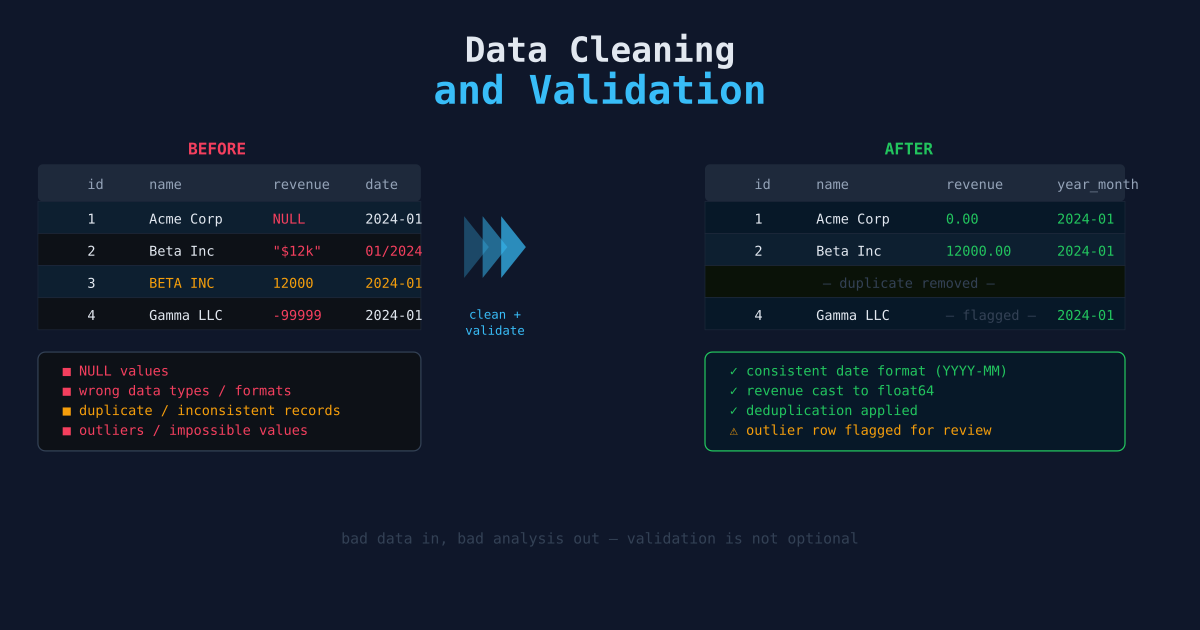
Raw data is almost never clean. Missing values, duplicates, inconsistent formatting, and impossible values are the rule, not the exception. Cleaning is not glamorous work, but skipping it silently poisons every downstream analysis. This article covers the most common problems and how to fix them systematically.
Why Cleaning Comes Before Analysis
The instinct is to dive straight into analysis. Resist it. A few minutes of dirty data profiling can save hours of debugging incorrect results. Models trained on dirty data learn the noise. Dashboards built on dirty data display wrong numbers. The output is only as trustworthy as the input.
The standard order: profile → clean → validate → use.
Step 1: Profile the Data
Before changing anything, understand what you have.
import pandas as pd

df = pd.read_csv("data/raw/records.csv")

# Basic shape
print(df.shape)           # (rows, columns)
print(df.dtypes)          # column types
print(df.describe())      # summary statistics for numeric columns

# Missing value counts
print(df.isnull().sum())

# Duplicate rows
print(df.duplicated().sum())

# Unique values per column (useful for categoricals)
for col in df.select_dtypes(include="object").columns:
    print(f"{col}: {df[col].nunique()} unique values")
This gives you a map of the problems before you start fixing them.
Step 2: Handle Missing Values
Missing data comes in three types:
- Missing completely at random (MCAR) — The missingness has no pattern. Safe to drop or impute.
- Missing at random (MAR) — Missingness depends on other observed columns. Impute carefully.
- Missing not at random (MNAR) — The missing value itself carries meaning (e.g., a user didn’t answer because the value was zero). Dropping or imputing distorts the signal.
Common strategies:
# Drop rows with any missing value (aggressive — use when rows are cheap)
df.dropna(inplace=True)

# Drop columns with more than 20% missing
threshold = len(df) * 0.8
df.dropna(axis=1, thresh=threshold, inplace=True)

# Fill numeric columns with the median (robust to outliers)
df["price"].fillna(df["price"].median(), inplace=True)

# Fill categorical columns with the mode
df["category"].fillna(df["category"].mode()[0], inplace=True)

# Flag missing values rather than imputing (preserves the information)
df["price_missing"] = df["price"].isnull().astype(int)
df["price"].fillna(0, inplace=True)
There is no universally correct approach. The right strategy depends on why the data is missing.
Step 3: Remove Duplicates
Duplicates inflate counts, skew aggregations, and bloat storage.
# Check for exact duplicates
print(df.duplicated().sum())

# Drop exact duplicates, keep first occurrence
df.drop_duplicates(inplace=True)

# Duplicates on a subset of columns (e.g., same user ID and date)
df.drop_duplicates(subset=["user_id", "date"], keep="last", inplace=True)
Keep-last is often preferred when data is append-only and newer rows represent corrections.
Step 4: Fix Data Types
Pandas reads columns as strings when it can’t infer the type. Numeric operations on string columns fail silently or raise errors.
# Coerce to numeric (non-parseable values become NaN)
df["price"] = pd.to_numeric(df["price"], errors="coerce")

# Parse dates
df["timestamp"] = pd.to_datetime(df["timestamp"], errors="coerce")

# Strip whitespace from string columns
df["name"] = df["name"].str.strip()

# Normalize case
df["status"] = df["status"].str.lower()
After coercion, re-check for new NaNs introduced by parsing failures.
Step 5: Detect and Handle Outliers
Outliers can be genuine (a $10,000 order in a dataset of $20 purchases) or dirty (a -999 sentinel value, a date of 9999-12-31).
# Statistical outlier detection using IQR
Q1 = df["price"].quantile(0.25)
Q3 = df["price"].quantile(0.75)
IQR = Q3 - Q1

lower = Q1 - 1.5 * IQR
upper = Q3 + 1.5 * IQR

# Flag rather than drop — investigate before deciding
df["price_outlier"] = ~df["price"].between(lower, upper)
print(df[df["price_outlier"]]["price"].describe())
Always investigate outliers before removing them. A $10,000 order might be your most valuable customer.
Step 6: Validate After Cleaning
Validation is the contract between your cleaning code and your downstream code. Write assertions that will fail loudly if the data violates expectations.
# No missing values in required columns
assert df["user_id"].notnull().all(), "user_id has nulls"
assert df["price"].notnull().all(), "price has nulls"

# Numeric ranges make sense
assert df["price"].ge(0).all(), "negative prices found"
assert df["quantity"].between(1, 10000).all(), "quantity out of range"

# No duplicates on primary key
assert not df["user_id"].duplicated().any(), "duplicate user IDs"

# Date range is plausible
assert df["timestamp"].min() > pd.Timestamp("2020-01-01"), "dates too early"
These assertions are the cheapest tests you will ever write. Put them at the end of every cleaning script.
Structuring a Cleaning Script
Keep raw data immutable. Never overwrite the source file.
data/
  raw/          # original downloads — never modified
  cleaned/      # output of cleaning scripts
  final/        # output of transformation/analysis scripts
import pandas as pd
INPUT = "data/raw/records.csv"
OUTPUT = "data/cleaned/records.csv"
def load(path):
return pd.read_csv(path)
def clean(df):
df = df.drop_duplicates()
df["price"] = pd.to_numeric(df["price"], errors="coerce")
df["timestamp"] = pd.to_datetime(df["timestamp"], errors="coerce")
df["name"] = df["name"].str.strip().str.lower()
df = df.dropna(subset=["user_id", "price", "timestamp"])
return df
def validate(df):
assert df["user_id"].notnull().all()
assert df["price"].ge(0).all()
return df
if __name__ == "__main__":
df = load(INPUT)
df = clean(df)
df = validate(df)
df.to_csv(OUTPUT, index=False)
print(f"Cleaned: {len(df)} rows written to {OUTPUT}")This pattern — load, clean, validate, save — makes cleaning reproducible and auditable.
Common Pitfalls
- Dropping too aggressively — Removing all rows with any null eliminates useful partial records. Drop only when the missing columns are required for the analysis.
- Imputing without flagging — Imputed values are not real. Flag them so downstream models can treat them differently.
- Cleaning in place — Modifying the source file means you can never re-run the pipeline from scratch.
- Silent type coercion —
errors="coerce"turns bad values into NaN. Always re-check null counts after coercing.
Schema Contracts with pandera
assert statements catch problems at runtime, but they don’t document the expected schema, and they don’t give useful error messages when the violation involves thousands of rows. pandera adds schema contracts: a declarative definition of what each column must look like, checked in one call.
pip install panderaDefine a schema once and reuse it across every script that handles the same data:
import pandera as pa
from pandera import Column, DataFrameSchema, Check

orders_schema = DataFrameSchema(
    {
        "order_id": Column(str, nullable=False, unique=True),
        "user_id":  Column(str, nullable=False),
        "amount":   Column(float, checks=[
            Check.ge(0, error="amount must be non-negative"),
            Check.le(100_000, error="amount suspiciously large"),
        ]),
        "status":   Column(str, checks=Check.isin(
            ["pending", "processing", "completed", "cancelled"]
        )),
        "created_at": Column("datetime64[ns]", nullable=False),
    },
    coerce=True,     # attempt type coercion before checking
    strict=False,    # allow extra columns not in the schema
)
Validate a DataFrame by calling .validate(). It returns the DataFrame if it passes, or raises a SchemaError with a detailed report if it fails:
def clean_and_validate(raw_path: str, clean_path: str):
    df = pd.read_csv(raw_path)

    # ... cleaning steps ...
    df["amount"] = pd.to_numeric(df["amount"], errors="coerce")
    df["created_at"] = pd.to_datetime(df["created_at"], errors="coerce")
    df = df.dropna(subset=["order_id", "user_id", "amount", "created_at"])

    # Validate against schema — raises SchemaError with row-level detail on failure
    validated = orders_schema.validate(df, lazy=True)

    validated.to_csv(clean_path, index=False)
    print(f"Validated {len(validated)} rows → {clean_path}")
lazy=True collects all violations before raising, so you see every problem at once instead of stopping on the first one.
Choosing Between assert and pandera
| Approach | Use when |
|---|---|
assert statements | Quick pipeline validation, simple scalar checks |
pandera schema | Shared across multiple scripts, complex column-level rules, need good error reporting |
You do not need both. For a one-file cleaning script, assert is sufficient. For schemas shared between a pipeline, a notebook, and a dashboard, pandera pays for itself quickly.
Next Steps
- Python Pandas Data Wrangling — Reshaping, grouping, and aggregating clean data.
- Organizing Data with SQL — Moving cleaned data into a queryable database.
- Building Your First Data Pipeline — Incorporating cleaning and validation into a repeatable automated workflow.