Contents
Working with CSV and JSON
🍎 Low Hanging Fruit
CSV and JSON account for the majority of data files you will encounter in the wild. Each has a simple concept and a surprising number of edge cases. This article covers both formats from the ground up, with practical code for reading, writing, and converting between them.
CSV: Comma-Separated Values
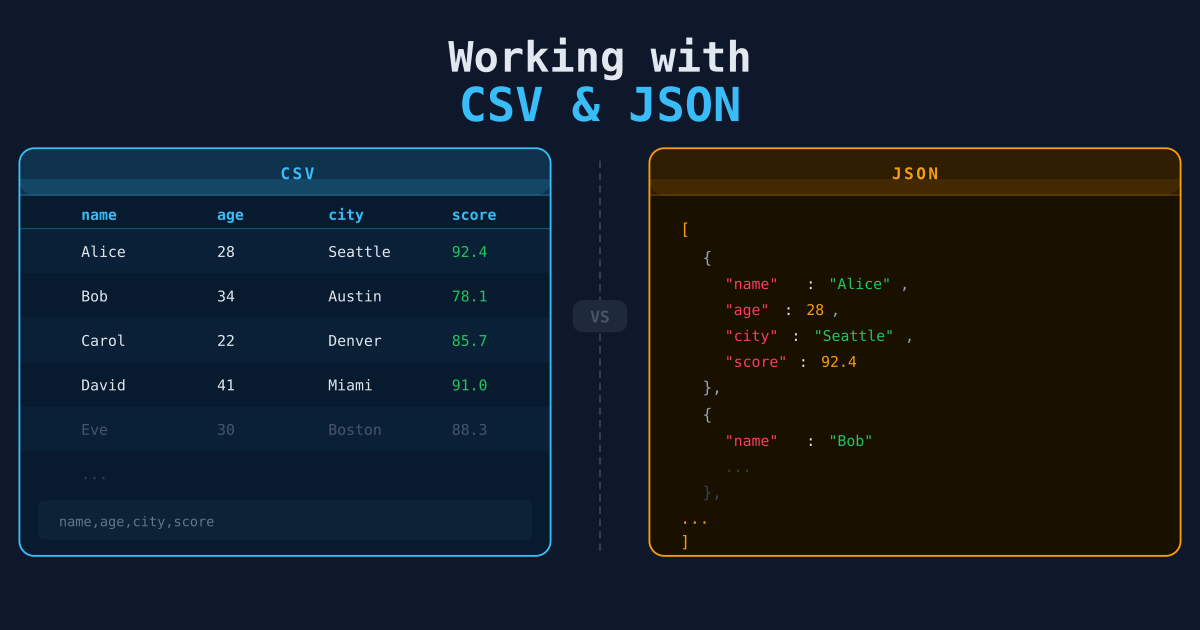
A CSV file is a plain-text table. Each line is a row; commas separate the columns. The first line is usually a header.
name,age,city
Alice,31,New York
Bob,25,Chicago
Carol,29,Austin
Simple. But here’s where it gets complicated:
Edge Cases You Will Hit
Commas inside values — If a value contains a comma, it must be quoted:
name,bio
Alice,"Engineer, writer, and occasional baker"
Newlines inside values — A quoted field can span multiple lines. Most parsers handle this correctly; most manual string splits do not.
Encoding — Older files are often ISO-8859-1 or Windows-1252, not UTF-8. You’ll know when you hit a UnicodeDecodeError. When that happens, try encoding='latin-1' first — it covers both ISO-8859-1 and Windows-1252 and handles the vast majority of cases. Files from Excel, government databases, or anything generated on Windows before 2018 are the usual offenders.
Trailing whitespace / inconsistent quoting — Real-world exports are messy. Columns may have extra spaces; some values may be quoted unnecessarily.
Reading CSV in Python
Always use the csv module or pandas rather than splitting on commas manually. This is not a style preference — the moment a field contains a quoted comma, a manual split produces wrong results silently. The csv module exists precisely to handle these cases. Using line.split(',') on CSV data is the kind of thing that works fine in testing and fails in production when the first real-world export comes in.
With the standard library:
import csv

with open("data.csv", newline="", encoding="utf-8") as f:
    reader = csv.DictReader(f)
    for row in reader:
        print(row["name"], row["age"])
DictReader maps each row to a dictionary using the header row as keys — almost always what you want.
With pandas:
import pandas as pd

df = pd.read_csv("data.csv")
print(df.head())
print(df.dtypes)
Pandas infers types automatically: numbers become int64 or float64, dates stay as strings unless you tell it otherwise.
Common read_csv Options
df = pd.read_csv(
    "data.csv",
    encoding="latin-1",        # for non-UTF-8 files
    sep=";",                   # for semicolon-delimited files
    skiprows=2,                # skip header garbage at the top
    parse_dates=["created_at"],# parse date columns
    na_values=["N/A", "null"], # treat these as NaN
    dtype={"zip_code": str},   # prevent leading zeros from being dropped
)
Writing CSV in Python
import csv

records = [
    {"name": "Alice", "age": 31, "city": "New York"},
    {"name": "Bob", "age": 25, "city": "Chicago"},
]

with open("output.csv", "w", newline="", encoding="utf-8") as f:
    writer = csv.DictWriter(f, fieldnames=["name", "age", "city"])
    writer.writeheader()
    writer.writerows(records)
Always pass newline="" to open() when writing CSVs on Windows — otherwise you get double line endings.
JSON: JavaScript Object Notation
JSON stores structured data as key-value pairs and arrays. It’s the default format for most APIs.
{
  "users": [
    {"id": 1, "name": "Alice", "active": true},
    {"id": 2, "name": "Bob",   "active": false}
  ],
  "total": 2
}
Reading JSON in Python
import json

with open("data.json", encoding="utf-8") as f:
    data = json.load(f)

users = data["users"]
for user in users:
    print(user["name"])
For API responses (already a string, not a file):
import requests

response = requests.get("https://api.example.com/users")
data = response.json()   # equivalent to json.loads(response.text)
Handling Nested JSON
The harder case is deeply nested JSON, where the field you want is buried several levels down. Flatten it explicitly:
raw = {
    "id": 42,
    "author": {"name": "Alice", "email": "alice@example.com"},
    "stats": {"views": 1200, "likes": 87}
}

flat = {
    "id": raw["id"],
    "author_name": raw["author"]["name"],
    "author_email": raw["author"]["email"],
    "views": raw["stats"]["views"],
    "likes": raw["stats"]["likes"],
}
json_normalize() handles the common case well, but it breaks down when the structure is inconsistent across records — some objects have a field, others don’t, some nest it differently. In those cases, you’re better off writing a small helper function that extracts exactly what you need than fighting normalize’s assumptions. Explicit is safer than clever when your data comes from the outside world.
For deeply nested or variable structures, pandas.json_normalize() handles most cases:
import pandas as pd

records = [
    {"id": 1, "author": {"name": "Alice"}, "stats": {"views": 1200}},
    {"id": 2, "author": {"name": "Bob"},   "stats": {"views": 540}},
]

df = pd.json_normalize(records)
# columns: id, author.name, stats.views
Writing JSON
import json

data = {"users": [{"id": 1, "name": "Alice"}]}

with open("output.json", "w", encoding="utf-8") as f:
    json.dump(data, f, indent=2, ensure_ascii=False)
indent=2 makes the output human-readable. ensure_ascii=False preserves non-ASCII characters (accents, CJK characters, etc.) instead of escaping them.
Converting Between CSV and JSON
JSON to CSV (flatten and write):
import json
import pandas as pd

with open("data.json") as f:
    records = json.load(f)

df = pd.json_normalize(records)
df.to_csv("output.csv", index=False)
CSV to JSON:
import pandas as pd

df = pd.read_csv("data.csv")
df.to_json("output.json", orient="records", indent=2)
orient="records" produces a JSON array of objects — the most useful shape for downstream consumption.
Line-Delimited JSON (JSONL)
Some APIs and log systems emit one JSON object per line rather than a single array. This format is called JSONL (or ndjson). It’s worth knowing because JSONL handles large files better than a standard JSON array: you can read it line by line without loading the whole thing into memory, and you can append new records without rewriting the file. If you’re generating output that other tools will consume, JSONL is often the friendlier choice.
{"id": 1, "name": "Alice"}
{"id": 2, "name": "Bob"}
Read it like this:
import json

records = []
with open("data.jsonl") as f:
    for line in f:
        records.append(json.loads(line.strip()))
Or with pandas:
df = pd.read_json("data.jsonl", lines=True)Next Steps
- Pulling Data from REST APIs — Fetch live JSON data from HTTP endpoints.
- Organizing Data with SQL — Load your CSV/JSON into a database for proper querying.
- Python & Pandas for Data Wrangling — Reshaping and cleaning the CSV and JSON data you have loaded.