Contents
Pulling Data from REST APIs
🍎 Low Hanging Fruit
REST APIs are the most common way to pull structured data from external services. Once you understand the pattern, you can collect data from virtually any source that exposes an HTTP endpoint — weather services, financial data providers, government databases, SaaS platforms, and more.
What Is a REST API?
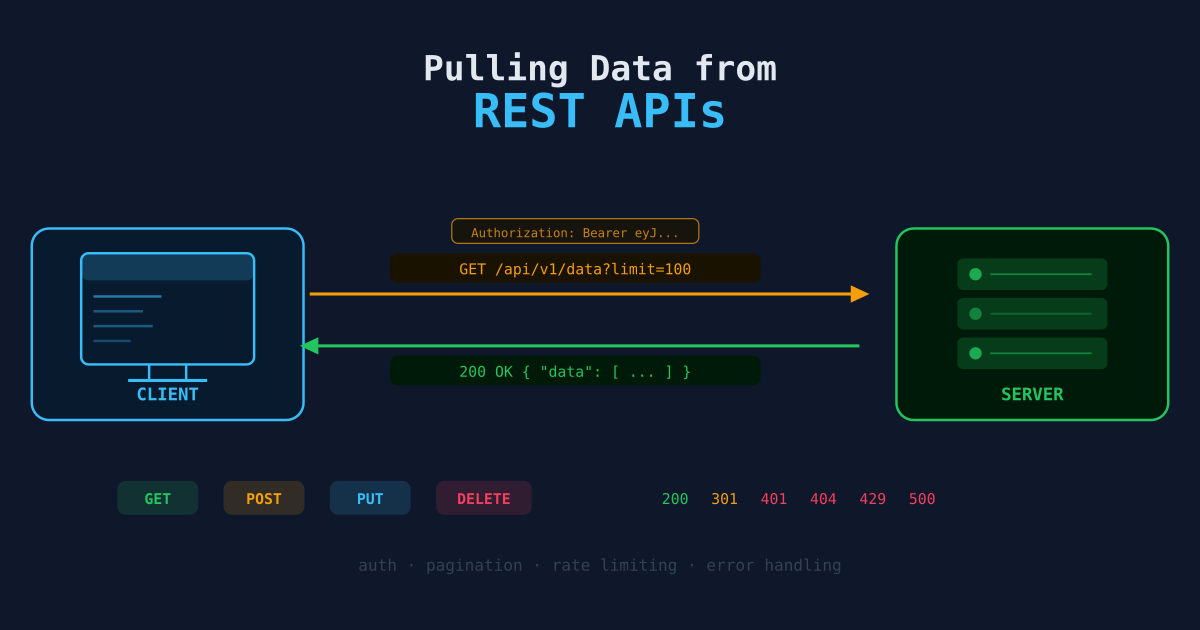
A REST API accepts HTTP requests and returns structured data — almost always JSON. You send a GET request to a URL (the endpoint), and the server responds with data.
GET https://api.example.com/users?limit=50&page=1The URL has three parts that matter:
- Base URL —
https://api.example.com - Path —
/users(identifies the resource) - Query parameters —
?limit=50&page=1(filters and options)
Making Your First Request
The requests library is the standard Python tool for HTTP:
import requests

response = requests.get("https://api.example.com/users")
print(response.status_code)  # 200 = success
print(response.json())       # parse the JSON body
Always check the status code before using the response. A 200 means success; 4xx means your request was wrong; 5xx means the server had a problem.
response = requests.get("https://api.example.com/users")
response.raise_for_status()  # raises an exception for 4xx/5xx
data = response.json()
raise_for_status() is the simplest way to make failures loud rather than silent.
Authentication
Most APIs require authentication. The three most common methods:
API Key in a Header
headers = {"Authorization": "Bearer YOUR_API_KEY"}
response = requests.get(url, headers=headers)
Some APIs use a custom header name:
headers = {"X-API-Key": "YOUR_API_KEY"}API Key as a Query Parameter
params = {"api_key": "YOUR_API_KEY", "limit": 100}
response = requests.get(url, params=params)
HTTP Basic Auth
response = requests.get(url, auth=("username", "password"))Store credentials in environment variables, never hardcode them:
import os

API_KEY = os.environ["MY_API_KEY"]
headers = {"Authorization": f"Bearer {API_KEY}"}
Handling Pagination
Most APIs won’t return all records in one response. They paginate — splitting results across multiple pages. There are three common pagination styles:
Page-Number Pagination
import requests

def fetch_all_pages(base_url, headers, page_size=100):
    records = []
    page = 1

    while True:
        resp = requests.get(
            base_url,
            headers=headers,
            params={"page": page, "per_page": page_size}
        )
        resp.raise_for_status()
        data = resp.json()

        batch = data.get("results", [])
        records.extend(batch)

        if len(batch) < page_size:
            break  # last page
        page += 1

    return records
Cursor-Based Pagination
Some APIs return a next_cursor or next_page_token instead of a page number:
def fetch_all_cursor(base_url, headers):
    records = []
    cursor = None

    while True:
        params = {"cursor": cursor} if cursor else {}
        resp = requests.get(base_url, headers=headers, params=params)
        resp.raise_for_status()
        data = resp.json()

        records.extend(data["items"])
        cursor = data.get("next_cursor")

        if not cursor:
            break

    return records
Link Header Pagination (GitHub style)
Some APIs embed the next-page URL directly in the Link response header:
def fetch_all_link(start_url, headers):
    records = []
    url = start_url

    while url:
        resp = requests.get(url, headers=headers)
        resp.raise_for_status()
        records.extend(resp.json())

        # parse Link header: <https://...?page=2>; rel="next"
        link = resp.headers.get("Link", "")
        url = None
        for part in link.split(","):
            if 'rel="next"' in part:
                url = part.split(";")[0].strip().strip("<>")
                break

    return records
Rate Limiting
APIs limit how many requests you can make per minute or per day. If you exceed the limit, you get a 429 Too Many Requests response. Handle it with a retry loop:
import time
import requests

def get_with_retry(url, headers, max_retries=5):
    for attempt in range(max_retries):
        resp = requests.get(url, headers=headers)

        if resp.status_code == 429:
            wait = int(resp.headers.get("Retry-After", 2 ** attempt))
            print(f"Rate limited. Waiting {wait}s...")
            time.sleep(wait)
            continue

        resp.raise_for_status()
        return resp.json()

    raise Exception(f"Failed after {max_retries} retries")
Adding a small time.sleep(0.1) between every request is good practice even before you hit rate limits — it avoids hammering the server.
A Complete Collection Script
Here’s a full example that ties everything together:
import os
import csv
import time
import requests

API_BASE = "https://api.example.com"
API_KEY  = os.environ["EXAMPLE_API_KEY"]
HEADERS  = {"Authorization": f"Bearer {API_KEY}"}

def fetch_records(endpoint, page_size=100):
    """Fetch all records from a paginated endpoint."""
    records = []
    page = 1

    while True:
        resp = requests.get(
            f"{API_BASE}/{endpoint}",
            headers=HEADERS,
            params={"page": page, "per_page": page_size},
        )

        if resp.status_code == 429:
            time.sleep(int(resp.headers.get("Retry-After", 5)))
            continue

        resp.raise_for_status()
        data = resp.json()
        batch = data.get("results", [])
        records.extend(batch)

        print(f"  Page {page}: {len(batch)} records")

        if len(batch) < page_size:
            break
        page += 1
        time.sleep(0.2)  # polite delay

    return records

def save_csv(records, path):
    if not records:
        print("No records to save.")
        return
    with open(path, "w", newline="", encoding="utf-8") as f:
        writer = csv.DictWriter(f, fieldnames=records[0].keys())
        writer.writeheader()
        writer.writerows(records)
    print(f"Saved {len(records)} records to {path}")

if __name__ == "__main__":
    print("Fetching users...")
    users = fetch_records("users")
    save_csv(users, "data/raw/users.csv")
Useful Tools for Exploring APIs
Before writing code, explore the API manually:
- curl — Quick command-line requests:
curl -H "Authorization: Bearer KEY" https://api.example.com/users - httpie — More readable CLI alternative:
http GET api.example.com/users Authorization:"Bearer KEY" - Postman / Insomnia — GUI tools for building and testing requests
Next Steps
- Organizing Data with SQL — Load your collected data into a database.
- Python & Pandas for Data Wrangling — Clean and reshape the data you’ve pulled.
- Building Your First Data Pipeline — Combining API collection with transformation and loading into a full automated workflow.