Contents
Working with Parquet and DuckDB
🌳 High Hanging Fruit
CSV and SQLite work fine up to a few million rows. Beyond that, query times start climbing and memory usage becomes a problem. Parquet and DuckDB solve both issues — Parquet stores data in a columnar format that compresses well and reads fast, and DuckDB queries it with SQL without loading the entire file into memory. Together they handle datasets that would bring pandas to its knees, without requiring a database server.
What is Parquet?
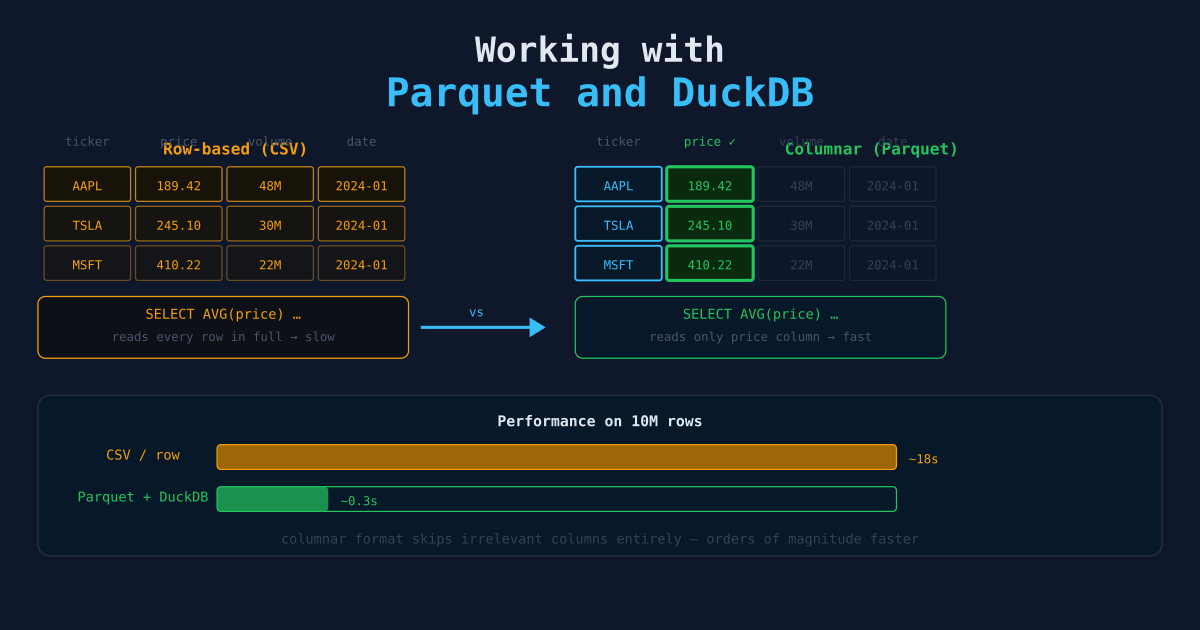
Parquet is a columnar file format originally developed for the Hadoop ecosystem. Instead of storing data row by row (like CSV), it stores data column by column. This has two major consequences:
- Compression is much better. Each column contains values of the same type, which compresses more efficiently than mixed-type rows. A 1 GB CSV often becomes 100–200 MB as Parquet.
- Analytical queries are faster. If you query only three columns from a 50-column dataset, Parquet reads only those three columns off disk. CSV must read the entire file.
Parquet is the standard format for data lakes, Spark jobs, and analytical workloads. If you are storing more than a few million rows, Parquet should be your default. The compression numbers are not hypothetical: a 1 GB CSV of stock price data commonly compresses to 80–150 MB as Parquet with snappy. If you’re paying for storage or transferring files regularly, the format switch pays for itself before you touch the query performance benefits.
What is DuckDB?
DuckDB is an in-process analytical SQL database. Like SQLite, it runs inside your Python process with no server required. Unlike SQLite, it is built for analytical queries — aggregations, window functions, and joins across large datasets run orders of magnitude faster.
DuckDB can query:
- Parquet files directly (without loading them into memory)
- CSV files
- pandas DataFrames
- JSON files
- Remote files over HTTP or S3
pip install duckdb pyarrow pandasWriting Parquet Files
From a pandas DataFrame
import pandas as pd

df = pd.read_csv("data/raw/prices.csv")
df.to_parquet("data/parquet/prices.parquet", index=False)
With explicit schema control (pyarrow)
import pyarrow as pa
import pyarrow.parquet as pq
import pandas as pd

df = pd.read_csv("data/raw/prices.csv")
df["date"] = pd.to_datetime(df["date"])
df["close"] = pd.to_numeric(df["close"])

table = pa.Table.from_pandas(df)
pq.write_table(table, "data/parquet/prices.parquet", compression="snappy")
snappy is the default compression — fast to decompress, moderate compression ratio. zstd gives better compression at a small speed cost. The rule of thumb: use snappy when query speed matters most, use zstd when you’re archiving or paying per GB of storage. The performance difference is small enough that you can switch later without rewriting your pipeline logic.
Partitioned Parquet (for large datasets)
Partition by a column you frequently filter on. Queries that filter on the partition column skip entire directories.
import pyarrow.parquet as pq
import pyarrow as pa

table = pa.Table.from_pandas(df)

pq.write_to_dataset(
    table,
    root_path="data/parquet/prices_partitioned",
    partition_cols=["year", "ticker"],
)
This creates a directory structure like:
prices_partitioned/
  year=2024/
    ticker=AAPL/
      part-0.parquet
    ticker=MSFT/
      part-0.parquet
  year=2025/
    ...
Querying with DuckDB
Basic queries
import duckdb

# Query a Parquet file directly — no loading into memory
result = duckdb.sql("""
    SELECT ticker, AVG(close) AS avg_close, COUNT(*) AS days
    FROM 'data/parquet/prices.parquet'
    WHERE date >= '2024-01-01'
    GROUP BY ticker
    ORDER BY avg_close DESC
""").df()

print(result)
.df() returns a pandas DataFrame. .fetchall() returns a list of tuples. .arrow() returns a PyArrow table.
Querying partitioned datasets
result = duckdb.sql("""
    SELECT ticker, date, close
    FROM read_parquet('data/parquet/prices_partitioned/**/*.parquet', hive_partitioning=true)
    WHERE year = 2025 AND ticker = 'AAPL'
""").df()
Querying a pandas DataFrame directly
DuckDB can reference in-memory DataFrames by variable name in SQL queries.
import duckdb
import pandas as pd

df = pd.read_csv("data/raw/prices.csv")

result = duckdb.sql("SELECT ticker, MAX(close) FROM df GROUP BY ticker").df()
This avoids loading the data twice. The DataFrame is never copied — DuckDB reads it zero-copy. This is the feature that surprises most pandas users: you can mix in-memory DataFrames and on-disk Parquet files in the same query. Partially processed data in memory, historical data in files — DuckDB treats them as the same thing.
Window functions
DuckDB has full SQL window function support, which pandas makes awkward.
result = duckdb.sql("""
    SELECT
        ticker,
        date,
        close,
        AVG(close) OVER (
            PARTITION BY ticker
            ORDER BY date
            ROWS BETWEEN 6 PRECEDING AND CURRENT ROW
        ) AS close_7d_avg,
        close - LAG(close, 1) OVER (PARTITION BY ticker ORDER BY date) AS daily_change
    FROM 'data/parquet/prices.parquet'
    ORDER BY ticker, date
""").df()
Performance Comparison
On a 10M row dataset:
| Operation | pandas CSV | pandas Parquet | DuckDB Parquet |
|---|---|---|---|
| Load file | 12.4s | 2.1s | — (not loaded) |
| Filter + aggregate | 0.8s | 0.8s | 0.2s |
| Peak memory | 1.8 GB | 800 MB | 120 MB |
DuckDB uses streaming execution — it processes data in chunks and never holds the full dataset in memory, which is why memory usage is dramatically lower. The memory number is the one that matters most in practice. Pandas loading 10M rows into 1.8 GB can kill a cloud function or a laptop with a browser open. DuckDB at 120 MB is the difference between “this works in production” and “this crashes at scale.”
A Practical Pattern: ETL to Parquet
import duckdb
import pandas as pd
from pathlib import Path

RAW_DIR = Path("data/raw")
PARQUET_DIR = Path("data/parquet")
PARQUET_DIR.mkdir(parents=True, exist_ok=True)

def convert_csv_to_parquet(csv_path: Path) -> Path:
    """Convert a CSV file to Parquet using DuckDB (fast, low memory)."""
    out_path = PARQUET_DIR / csv_path.with_suffix(".parquet").name
    duckdb.sql(f"""
        COPY (SELECT * FROM read_csv_auto('{csv_path}'))
        TO '{out_path}' (FORMAT PARQUET, COMPRESSION 'snappy')
    """)
    return out_path

def query_prices(ticker: str, start_date: str) -> pd.DataFrame:
    return duckdb.sql(f"""
        SELECT date, open, high, low, close, volume
        FROM '{PARQUET_DIR}/prices.parquet'
        WHERE ticker = '{ticker}'
          AND date >= '{start_date}'
        ORDER BY date
    """).df()

if __name__ == "__main__":
    for csv_file in RAW_DIR.glob("*.csv"):
        out = convert_csv_to_parquet(csv_file)
        print(f"Converted {csv_file.name} → {out.name}")

    df = query_prices("AAPL", "2024-01-01")
    print(df.head())
When to Use What
| Use case | Recommended |
|---|---|
| < 100K rows, simple queries | pandas + CSV |
| 100K–10M rows, frequent re-reads | pandas + Parquet |
| > 1M rows, analytical SQL | DuckDB + Parquet |
| Sharing data with other tools (Spark, BigQuery) | Parquet |
| Transactional writes (INSERT/UPDATE) | SQLite or PostgreSQL |
DuckDB is not a replacement for transactional databases. It is an analytical query engine. For pipelines that mix high-frequency writes with heavy reads, use PostgreSQL for writes and export to Parquet for analysis.
Next Steps
- Organizing Data with SQL — Structuring data for queryability before moving to columnar formats.
- Building Your First Data Pipeline — Where Parquet fits in a full pipeline.
- DuckDB for Financial Data Analysis — A worked example of DuckDB applied to real financial market data.