Contents
Working with WebSockets and Streaming Data
🌳 High Hanging Fruit
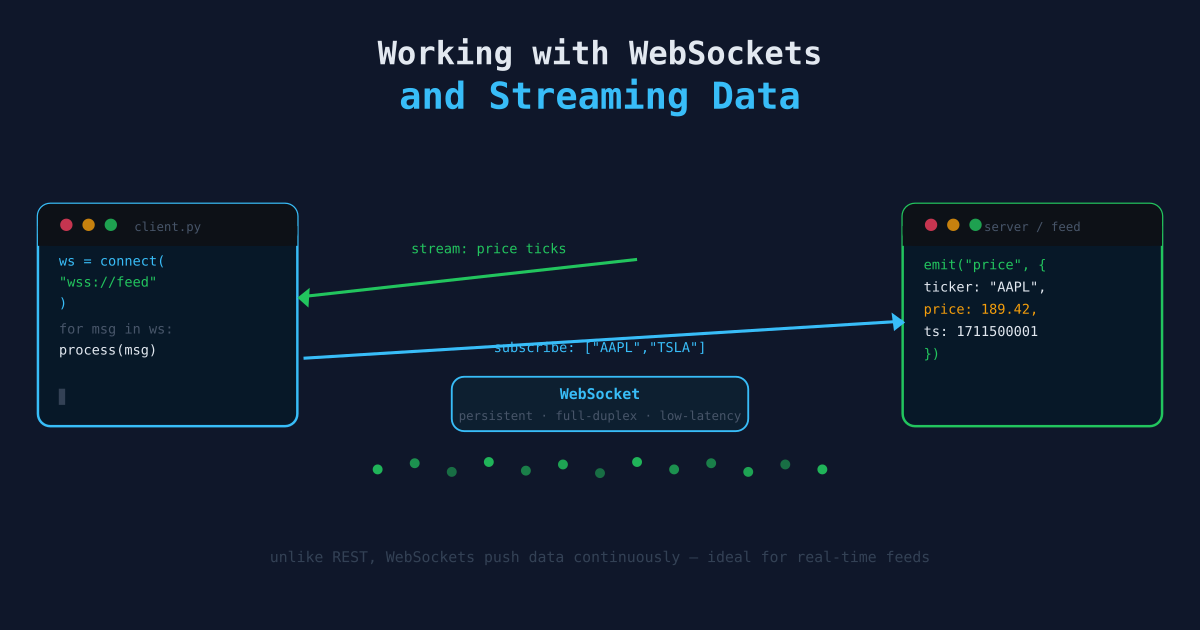
Most data collection tutorials focus on REST APIs — you send a request, you get a response. But some data doesn’t fit that model. Stock prices tick continuously. Order books update hundreds of times per second. News breaks in real time. For these sources, you need a persistent connection that pushes data to you as it happens. That’s what WebSockets are for.
REST vs. WebSockets
With REST, you pull:
Client → GET /prices/AAPL → Server
Client ← { price: 182.50 }  ← Server
# ... wait 1 second ...
Client → GET /prices/AAPL → Server
Client ← { price: 182.51 }  ← Server
With WebSockets, the server pushes:
Client ←→ WS connection established
Server → { price: 182.50 }
Server → { price: 182.51 }
Server → { price: 182.49 }
# ... continuously, until connection closes
The difference matters for high-frequency data. Polling a REST endpoint every second creates 3,600 HTTP requests per hour per ticker. A single WebSocket connection delivers all updates with far less overhead. The request count is not just an efficiency concern — many APIs rate-limit by request count. A WebSocket subscription that streams every update uses one connection slot. The same data via polling can exhaust your daily API quota before lunch.
Core Concepts
- Handshake — A WebSocket connection starts as an HTTP request that is “upgraded” to a persistent WebSocket connection.
- Frame — Data is sent in frames. Text frames carry JSON; binary frames carry raw bytes.
- Heartbeat / Ping-Pong — Most servers send periodic pings to verify the connection is alive. Your client must respond with pongs, or the server will close the connection.
- Reconnection — WebSocket connections drop. Real pipelines need automatic reconnection logic. The harder failure mode is a stalled connection — the WebSocket is technically open, the server thinks it’s alive, but messages have stopped coming. This is why heartbeat monitoring is not optional; a stream that silently stops delivering data is worse than one that crashes loudly.
Basic WebSocket Client
pip install websocketsimport asyncio
import json
import websockets
async def stream_prices(uri: str):
async with websockets.connect(uri) as ws:
# Subscribe to a ticker after connecting
await ws.send(json.dumps({
"action": "subscribe",
"params": "T.AAPL,T.MSFT"
}))
async for message in ws:
data = json.loads(message)
print(data)
asyncio.run(stream_prices("wss://stream.example.com/v2/stocks"))The async for message in ws: loop blocks and processes each incoming message. The connection stays open until the loop breaks or an exception is raised.
Practical Example: Alpaca Market Data Stream
Alpaca provides a free real-time stock data WebSocket feed for US equities. Their free tier streams 15-minute delayed quotes; paid tiers stream live data.
import asyncio
import json
import websockets
import csv
from datetime import datetime
from pathlib import Path

ALPACA_WS = "wss://stream.data.alpaca.markets/v2/iex"
API_KEY = "your_api_key_here"
API_SECRET = "your_api_secret_here"
TICKERS = ["AAPL", "MSFT", "GOOG"]

OUTPUT = Path("data/streaming/trades.csv")
OUTPUT.parent.mkdir(parents=True, exist_ok=True)

async def authenticate(ws):
    auth_msg = {"action": "auth", "key": API_KEY, "secret": API_SECRET}
    await ws.send(json.dumps(auth_msg))
    response = json.loads(await ws.recv())
    if response[0]["T"] != "success":
        raise RuntimeError(f"Auth failed: {response}")

async def subscribe(ws, tickers: list):
    sub_msg = {"action": "subscribe", "trades": tickers}
    await ws.send(json.dumps(sub_msg))
    response = json.loads(await ws.recv())
    print(f"Subscribed: {response}")

async def stream_to_csv():
    with open(OUTPUT, "a", newline="") as f:
        writer = csv.writer(f)

        async with websockets.connect(ALPACA_WS) as ws:
            await authenticate(ws)
            await subscribe(ws, TICKERS)

            async for raw in ws:
                messages = json.loads(raw)
                for msg in messages:
                    if msg["T"] == "t":  # trade event
                        writer.writerow([
                            msg["S"],   # symbol
                            msg["p"],   # price
                            msg["s"],   # size
                            msg["t"],   # timestamp
                        ])
                        f.flush()
                        print(f"{msg['S']} {msg['p']} @ {msg['t']}")

asyncio.run(stream_to_csv())
Reconnection with Exponential Backoff
WebSocket connections drop — network blips, server restarts, rate limit resets. A production client needs automatic reconnection.
import asyncio
import json
import websockets
import logging
from datetime import datetime

logger = logging.getLogger(__name__)

async def connect_with_retry(uri: str, handler, max_retries=10):
    delay = 1
    attempt = 0

    while attempt < max_retries:
        try:
            logger.info(f"Connecting to {uri} (attempt {attempt + 1})")
            async with websockets.connect(uri, ping_interval=20, ping_timeout=10) as ws:
                delay = 1  # reset on successful connection
                attempt = 0
                await handler(ws)
        except websockets.exceptions.ConnectionClosedOK:
            logger.info("Connection closed cleanly. Reconnecting...")
        except websockets.exceptions.ConnectionClosedError as e:
            logger.warning(f"Connection closed with error: {e}. Reconnecting in {delay}s...")
        except Exception as e:
            logger.error(f"Unexpected error: {e}. Reconnecting in {delay}s...")

        await asyncio.sleep(delay)
        delay = min(delay * 2, 60)  # cap backoff at 60 seconds
        attempt += 1

    raise RuntimeError("Max retries exceeded")
Pass your message-handling coroutine as handler. The outer loop handles all reconnection logic.
Writing to a Database Instead of CSV
Start with CSV append. It requires no schema, no setup, and you can open the file in any tool immediately. Once you have data flowing and understand its shape, migrate to SQLite or a proper database. The temptation to engineer the storage layer before you understand the data is real — resist it. Many streaming projects never make it to production because they spent the first week on the wrong problem.
That said, CSV append is simple but creates large files with no query capability. SQLite works well for streaming data with a simple write loop once you’re ready to move on.
import sqlite3
from datetime import datetime

conn = sqlite3.connect("data/streaming/trades.db")
conn.execute("""
    CREATE TABLE IF NOT EXISTS trades (
        symbol TEXT,
        price REAL,
        size INTEGER,
        timestamp TEXT,
        received_at TEXT
    )
""")
conn.commit()

def save_trade(symbol, price, size, timestamp):
    conn.execute(
        "INSERT INTO trades VALUES (?, ?, ?, ?, ?)",
        (symbol, price, size, timestamp, datetime.utcnow().isoformat()),
    )
    conn.commit()
For higher write throughput, batch inserts:
BUFFER = []
FLUSH_EVERY = 100  # rows

def buffer_trade(symbol, price, size, timestamp):
    BUFFER.append((symbol, price, size, timestamp, datetime.utcnow().isoformat()))
    if len(BUFFER) >= FLUSH_EVERY:
        conn.executemany("INSERT INTO trades VALUES (?, ?, ?, ?, ?)", BUFFER)
        conn.commit()
        BUFFER.clear()
Aggregating Real-Time Ticks into OHLCV Bars
Raw tick data is noisy. Most analyses work on aggregated bars (1-minute, 5-minute, etc.). Build bars from ticks in real time:
from collections import defaultdict
from datetime import datetime, timedelta

bars = defaultdict(lambda: {"open": None, "high": None, "low": None, "close": None, "volume": 0})
bar_start = {}

BAR_MINUTES = 1

def update_bar(symbol: str, price: float, size: int, ts: datetime):
    # Determine which bar this tick belongs to
    bar_key = ts.replace(second=0, microsecond=0) - timedelta(minutes=ts.minute % BAR_MINUTES)

    bar = bars[(symbol, bar_key)]

    if bar["open"] is None:
        bar["open"] = price
    bar["high"] = price if bar["high"] is None else max(bar["high"], price)
    bar["low"] = price if bar["low"] is None else min(bar["low"], price)
    bar["close"] = price
    bar["volume"] += size

    return bar_key, bar
When the bar period rolls over, the completed bar is ready to save or feed to a model.
Monitoring Stream Health
A stream that silently stalls is worse than a stream that crashes loudly. Add heartbeat monitoring:
import asyncio
from datetime import datetime

last_message_at = datetime.utcnow()
STALE_AFTER_SECONDS = 30

async def monitor_health():
    while True:
        await asyncio.sleep(10)
        age = (datetime.utcnow() - last_message_at).seconds
        if age > STALE_AFTER_SECONDS:
            print(f"WARNING: No messages in {age}s — stream may be stalled")
Run monitor_health() as a background task alongside the main stream coroutine using asyncio.gather.
When to Use WebSockets vs. REST
| Use case | Use |
|---|---|
| Historical data, bulk download | REST |
| Data updated once per minute or slower | REST with polling |
| Real-time prices, order books | WebSocket |
| News and events as they happen | WebSocket or SSE |
| IoT sensor streams | WebSocket or MQTT |
WebSockets add operational complexity — reconnection logic, heartbeat handling, buffer management. Use them when the latency or efficiency of polling is genuinely a problem. The reconnection code in this article is largely copy-paste, so the operational overhead is lower than it sounds. The real question is whether your data genuinely changes faster than you can poll it. If you’re polling once a minute and the data updates every 30 seconds, WebSockets are worth it. If you’re polling once every 5 minutes, keep polling.
Next Steps
- Scheduling and Automating Pipelines — Running your streaming collector as a persistent service.
- Pulling Data from REST APIs — The polling alternative for lower-frequency data.
- Building Your First Data Pipeline — The foundational pipeline pattern that streaming and polling architectures build on.